Table of Contents
ToggleUnder cabinet lighting has evolved from a luxury add-on to a practical staple in modern kitchens. Good task lighting transforms how you prep food, read recipes, and work at countertops, while adding visual warmth and resale value to your home. LED under cabinet lighting, in particular, delivers efficiency and longevity at a price point that makes DIY installation realistic for most homeowners. This guide walks you through the why, what, and how of adding LED under kitchen cabinet lighting to your space.
Key Takeaways
- LED under kitchen cabinet lighting improves task safety and functionality while adding visual depth, warmth, and resale value to your home with 80% less energy consumption than older lighting technologies.
- Choose between linear strip lights for even, polished illumination across countertops or puck lights for targeted spotlighting, and select warm white (3000K) for ambiance or neutral white (4000K) for detailed work.
- Plug-in LED strips offer 10-minute installation but require nearby outlets and visible cords, while hardwired options demand more upfront effort but deliver a cleaner, permanent installation with integrated dimming control.
- Measure your cabinet runs carefully, mount aluminum channels to the cabinet face frame to direct light downward, and ensure overlapping coverage between adjacent sections to eliminate dark spots.
- For hardwired installations, hire a licensed electrician to ensure GFCI protection compliance and proper wire routing through cabinets, as kitchen electrical codes are strict and mistakes pose safety risks.
- Most plug-in projects take 2 to 4 hours while hardwired installations require a full weekend, but both deliver immediate functionality improvements and make LED under cabinet lighting a high-return DIY project for any kitchen.
Why LED Under Cabinet Lighting Is Essential for Modern Kitchens
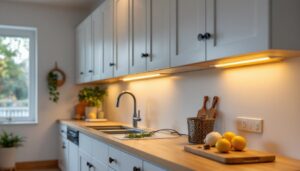
LED under cabinet lighting serves two jobs at once: it’s functional and aesthetic. From a practical standpoint, counter work, chopping vegetables, checking recipe details, or finding that one spice, becomes easier and safer with direct light from above rather than relying on ceiling fixtures that cast shadows where your body blocks light. Your eyes thank you.
From a design perspective, under cabinet lighting adds depth to your kitchen. It highlights countertops and backsplashes, softens the space in the evening, and can even make small kitchens feel larger. LED technology delivers all this without the heat output or energy drain of incandescent or halogen strips, you’re looking at roughly 80% less energy consumption than older technologies, and bulbs that last 25,000 to 50,000 hours.
That longevity matters. If you’re installing hardwired lights, you’re making a semi-permanent improvement. LEDs won’t have you on a ladder every six months. Installation also adds resale appeal: many buyers see under cabinet lighting as a marker of a well-maintained kitchen. Whether you’re upgrading for comfort, aesthetics, or home value, LED under cabinet lighting delivers on all fronts.
Types of LED Under Cabinet Light Fixtures to Choose From
Puck Lights and Linear Strip Lights
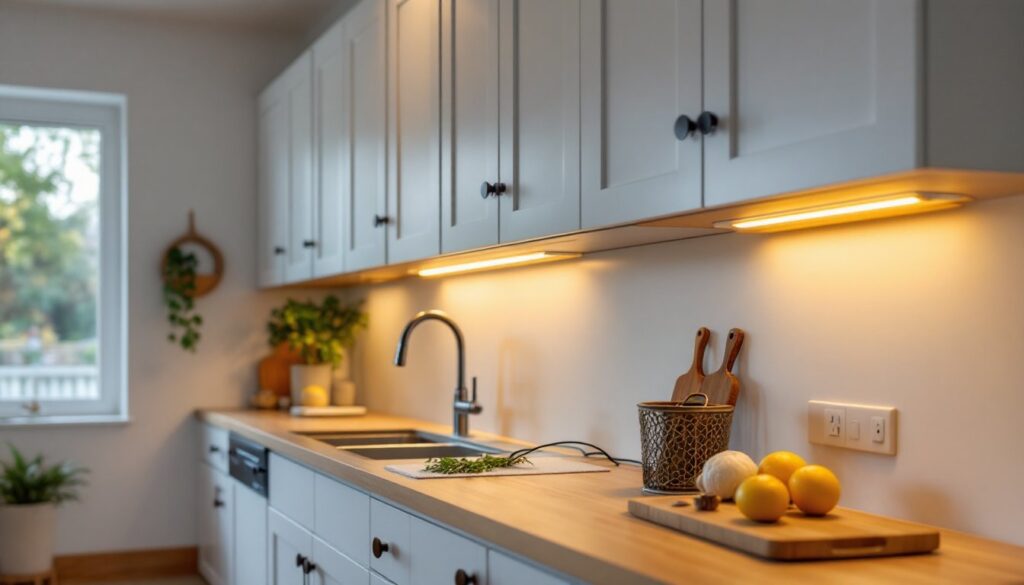
Puck lights are small, round fixtures mounted individually under cabinets. They’re ideal for targeted task lighting and work well if you have open shelving or want adjustable spotlighting. Linear strip lights run the length of the cabinet and deliver even, consistent illumination, they’re the go-to for most kitchen remodels. Strips come in aluminum channels that protect the LED module and diffuse light evenly across your countertop. They’re less obtrusive than puck lights and create a more polished look.
For color, stick with 3000K (warm white) or 4000K (neutral white). The 3000K option feels cozier for open kitchens: 4000K is brighter and better for detailed work. Avoid pure 5000K daylight temperature unless you want your kitchen to feel like an operating room. Most LED strips offer dimmable options, which you should seriously consider, dimming down evening lighting creates ambiance without the glare.
Plug-In versus Hardwired Options
Plug-in LED strips are the easiest path: they come with adhesive backing, a power cable, and a standard outlet connection. Installation takes 10 minutes. The trade-off is that you’ll see a cord running along your backsplash or up the side of a cabinet to a nearby outlet. They’re also less integrated into your kitchen’s electrical system, so moving or upgrading later means dealing with extra wiring.
Hardwired options require running wiring through your cabinet structure (or behind your backsplash) to a dedicated circuit or a switched outlet. This demands more work upfront, you may need to drill, rout, or fish wire, but the payoff is a cleaner, more permanent installation. Hardwired also allows you to integrate dimming switches into your existing kitchen electrical layout. If your kitchen has a closed soffit between cabinets and ceiling, hardwiring is nearly invisible. For most DIYers, hardwired is worth the extra effort if you’re already remodeling or comfortable with basic electrical routing. If you’re renting or hesitant about electrical work, plug-in strips get the job done.
Planning Your Under Cabinet Lighting Layout
Before you buy a single LED strip, measure your cabinet run and plan fixture placement. Start by measuring the interior front-to-back depth of your cabinets and the width of your counter areas. Most aluminum LED channels are 3/4-inch wide and mount to the underside of the cabinet face frame (the horizontal support structure at the front), this positions light to shine straight down onto the counter, not sideways into your eyes.
Count how many linear sections you need. If you have a long run, say 10 feet of continuous counter, you might use one 8-foot strip plus one 2-foot section, or split it into shorter segments with breaks at cabinet edges. Shorter sections are easier to install and allow flexibility if a cabinet has a dishwasher or other appliance in the run.
For islands or peninsulas, light both sides so you’re not working in shadow. If using puck lights, space them 16 to 24 inches apart along the underside of the cabinet. Most kitchens benefit from overlapping coverage between adjacent cabinet runs, it eliminates dark spots.
Check the outlet situation. Plug-in strips need an outlet within reach of the cord (usually 6 feet). Hardwired fixtures can be connected to an existing circuit or run to a new dedicated line. If you’re hardwiring and lack electrical experience, this is the point to call a licensed electrician. Your local electrical code (NEC, National Electrical Code) governs kitchen circuits, and most jurisdictions require GFCI protection for countertop circuits. Don’t skip this, it’s a safety requirement, not an option.
Step-by-Step Installation Guide for DIY Projects
Materials:
• LED light strips or puck lights (measured and counted in the planning step)
• Aluminum channel or mounting hardware (supplied with most quality LED strips)
• Self-tapping screws or clips (usually included)
• Wire nuts or connectors (if hardwiring)
• 14-gauge electrical wire (if hardwiring: check your local code)
• Silicone caulk (optional, for sealing gaps)
Tools:
• Drill with bits (1/8-inch for pilot holes)
• Tape measure
• Level
• Screwdriver (usually Phillips)
• Wire stripper and small flat-head screwdriver (if hardwiring)
• Jigsaw or oscillating multi-tool (if fitting around corners or obstacles)
• Safety goggles and work gloves
Installation Steps (Plug-In):
-
Clean the underside of your cabinet thoroughly with a degreaser. LED adhesive tape won’t stick to dust or grease. Let dry completely.
-
Test-fit the aluminum channel against the cabinet underside. If your cabinet has a face frame (most do), the channel should sit just at or slightly behind the frame edge, this positions light to hit the counter surface, not the cabinet above.
-
Mark mounting holes. Use a pencil to mark screw locations every 12 inches along the channel. Double-check alignment with a level.
-
Drill pilot holes (1/8-inch) to prevent wood splitting. Screw the aluminum channel firmly to the cabinet, don’t rely solely on adhesive tape: the weight and vibration will fail it over time.
-
Insert the LED strip module into the channel and secure any end caps.
-
Route the power cord along the cabinet side or underside, securing it with clips or adhesive cable ties. Aim for an outlet nearby (usually behind or beside a cabinet, below the counter).
-
Plug in and test. If the strip is dim, check that you’re using the correct power adapter, LED strips are picky about voltage.
Installation Steps (Hardwired, Intermediate DIY):
-
Follow steps 1–5 above for mounting the channel and strip.
-
Plan your wire route. If running wire through the cabinet interior, drill a 3/8-inch hole through the side or back panel near the top, then fish 14-gauge Romex cable up and behind the backsplash or through the soffit above.
-
If you lack experience fishing wire through walls, or if your cabinets are custom or filled with plumbing/gas lines, stop here and hire a licensed electrician. This isn’t a place to guess.
-
Connect the LED strip’s power lead to the electrical wire using wire nuts. Wrap connections with electrical tape.
-
Route the other end of the Romex to your breaker panel or to a switched outlet. If connecting to an outlet, ensure it’s GFCI-protected, test the outlet with a GFCI plug or call an electrician.
-
Secure the wire along the cabinet interior with cable staples, spaced no more than 16 inches apart. Avoid pinching the wire.
-
Test the light before finalizing any connections. If it works, secure any remaining clips and caulk gaps where wire exits the cabinet.
Pro Tips:
• Always measure twice, drill once. Cabinets often hide surprises (old wiring, plumbing, supports) behind their face.
• If your LED strip has a remote dimmer, mount it to the side of a cabinet or on the backsplash for easy reach.
• Use anti-vibration clips if your kitchen is open to the dining area, some LED drivers hum at certain frequencies.
• Check that your LED strip is dimmable before you buy a dimmer switch: not all strips support it.
Installation typically takes 2 to 4 hours for a straightforward plug-in project, or a full weekend if hardwiring and routing wire. Most homeowners find it worth the time investment.
Conclusion
LED under cabinet lighting is one of the highest-return kitchen projects you can tackle. It improves functionality, adds visual appeal, and costs far less than cabinet replacement or countertop upgrades. Whether you choose plug-in strips for speed or hardwired fixtures for permanence, the payoff is immediate, better task lighting, a warmer kitchen atmosphere, and visible added value. Start with a realistic assessment of your skill level and electrical setup, measure carefully, and don’t skip prep work or safety steps. Your kitchen will feel transformed, and you’ll wonder how you ever worked without it.